Kristina Schulz

Updated 2 months ago

A Smart Uninstallation Utility for macOS

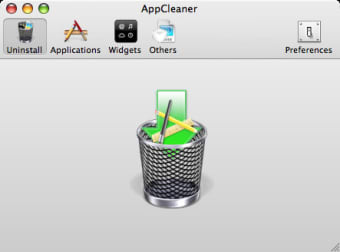
AppCleaner, developed by FreeMacSoft, is a free uninstaller for macOS designed to remove applications and their associated files. This lightweight utility provides a simple way to keep systems organized by deleting leftover items such as caches, preferences, and support files. Its installation process is quick and straightforward, making it suitable for users of all experience levels.

Clean Design and Easy Navigation

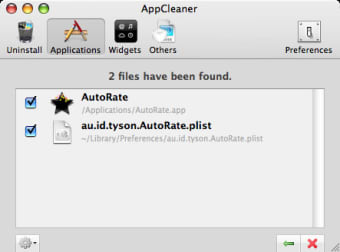
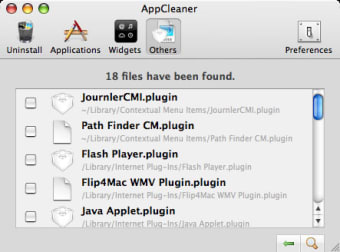
The interface of AppCleaner is minimal and intuitive, featuring convenient drag-and-drop functionality for removing unwanted apps. It also includes a browser that lists installed programs, displaying file sizes and locations to help users choose what to delete. This design allows clear visibility into associated data, offering greater control during uninstallation without adding unnecessary complexity.

Maintaining Efficiency with SmartDelete

The standout SmartDelete feature automatically detects applications moved to the Trash and offers to remove leftover files. Users can also mark important apps as protected to prevent accidental deletion. Combined with its small file size and low system impact, these features make AppCleaner an efficient tool for keeping macOS devices clean and clutter-free.

Lightweight and Dependable for Everyday Use

While AppCleaner focuses solely on application removal rather than system optimization, it performs this task effectively without requiring extra resources. Its simplicity and precision make it a dependable option for users who prefer manual control over automatic cleaning suites. The app is free, ad-free, and safe to install, reinforcing its appeal as a trusted maintenance utility for macOS.


Kristina Schulz

Kristina has professional experience in Europe, the United States, and Asia, specializing in communication and languages. She values adaptability in multicultural settings and brings this perspective to her writing. Her content reflects clarity, cross-cultural awareness, and practical expertise in connecting ideas through language.

  • Pros

    • Free and lightweight, with minimal system impact
    • Drag-and-drop interface and clear file listings
    • SmartDelete automatically removes leftover files
    • Allows protection of important apps to prevent mistakes
  • Cons

    • Limited to app removal, not full system cleaning or optimization
 0/3

App specs

Program available in other languages


User reviews about AppCleaner

3.7

12 reviews

Add review

Main reviews for you

  • Anonymous user

    I gave it an 8 because softonic asked me to review it after only five minutes use... It worked fine and took some stuff off the computer including CleanMy MacX which was nagging for cash to do the same job. Take that CleanMyMacX

  • Anonymous user

    Very happy with this app. I originally obtained this app through the Mac App Store, but they no longer have it. I have had version 2.1.0 for awhile now and have had absolutely no problems with any aspect. It totally takes the worry out of uninstalling all those little apps I never use. When it searches for all the related files, I sometimes see a number of them. And it makes me happy to see that this surprisingly bulky app has been thoroughly deleted. Pros: Drag and dropEntirely simple Cons: None

  • Anonymous user

    AppCleaner update. I have 10.6.3. I downloaded an update to AppCleaner. It opened with a notice that it only worked with a system update. I do not want to update my system. I no longer have an AppCleaner I can use. Cons: I have 10.6.3. I downloaded an update to AppCleaner. It opened with a notice that it only worked with a system update. I do not want to update my system. I no longer have an AppCleaner I can use.

  • Anonymous user

    Best app for deleting other apps.. Better than AppZapper (which I got as part of a bundle) and better than all other uninstall apps out there. The fact it's free makes this a no-brainer if you're in the market. Pros: FreeGreat InterfaceEffective Cons: None

  • Anonymous user

    Simply amazing!. It works as a jewel. Best app around !As AleMello i think it should be integrated in mac os x. No reason for all of us to get it on top! ;)keep working though! :)

  • Anonymous user

    Brilliantly simple. Simple, effective, free. Doesn't get better than that. Drag and drop, or search for Applications and more from within the App. Love it.

More

You may also like

Alternatives to AppCleaner

Explore Apps

Latest articles

Laws concerning the use of this software vary from country to country. We do not encourage or condone the use of this program if it is in violation of these laws.
Softonic

Is AppCleaner safe?

100/100

Score result: Clean

This file passed a comprehensive security scan using VirusTotal technology. It is safe to download.

  • Virus free
  • Spyware free
  • Malware free
  • Verified by Security Partners

    VirusTotal logo

Scan Info

Last scan
Monday, August 19, 2024
Scan provider
VirusTotal · Full report

File Integrity

File
AppCleaner_V3.6.8.zip
SHA256
e012f729442473c20e7cce334b00182521e4b6672ea681b34931b180feb3d6be
SHA1
df5ea57285b7bc578a99a544c794909c330763a8

Softonic security commitment

AppCleaner has been thoroughly scanned by our advanced security systems and verified by industry-leading partners. This file comes from the official developer and has passed all our security checks, showing no signs of viruses, malware, or spyware. For more information, visit our Security and Trust Center